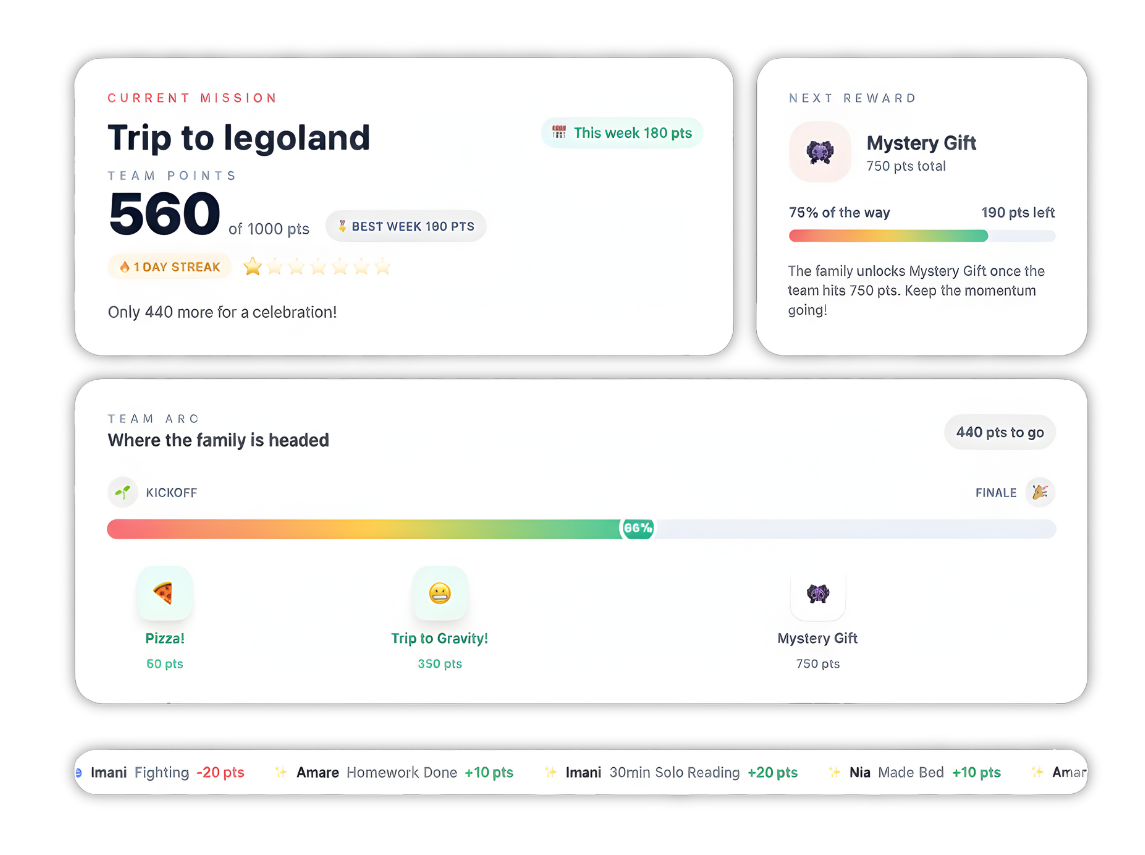
You know the drill. You ask your child to clean their room. Then you ask again. And again. Suddenly, you're yelling, they're crying, and the room is still messy.
We've all been there. It's exhausting to play the role of the "chore police" every single day.
But getting kids to help around the house doesn't have to be a battle. The trick is moving away from nagging and toward a system that makes habits clear, fun, and rewarding. That's where a digital chore chart comes in. Unlike a paper chart that gets lost under a pile of mail or thrown in the trash, these apps live on the devices you already use.
In this guide, we've reviewed the 5 best chore charts for kids. We looked at how easy they are to set up, how much they cost, and—most importantly—if kids actually like using them.
Here is a quick look at the top tools to get your family back on track.
Top 5 Chore Chart Apps Comparison
- Family Goals: Best for Building Habits
Family Goals takes the top spot because it understands that a 4-year-old needs a totally different system than a 14-year-old. It isn't just a checklist; it's a complete behavior system designed to strengthen family bonds through positive reinforcement.
While many apps force you into one way of doing things, Family Goals offers three distinct dashboard modes. You can use a digital sticker chart for your toddler, a points-based behavior chart for your 7-year-old, and an allowance tracker for your teenager—all under one account.
Key Features
- 3 Core Dashboard Modes: Digital Sticker Chart (Ages 2-7), Behavior Chart System (Ages 5-12), Pocket Money Manager (Ages 8+)
- Unlimited Children: Add as many children as you want to a single family account with personalized dashboards
- Family Link Sharing: Share read-only progress with grandparents or caregivers for milestone celebrations
Pricing
Where Family Goals Shines
- Adaptability: The only app that effectively covers toddlers to teens without switching platforms
- Positive Focus: Science-based approach focusing on celebration and encouragement
- Resources: Massive library of free tools including reading plans and printable charts
Where Family Goals Falls Short
- Digital Focus: Requires device for best experience, not ideal for 100% screen-free families
- No Debit Card: Tracks money digitally but doesn't issue physical debit cards
Customer Reviews
Parents using the platform often mention the "peace of mind" the app brings. Users appreciate the ability to switch between modes without losing progress. One common sentiment is that the visual feedback helps turn morning routines from a struggle into a game kids want to win.
Who Family Goals Is Best For
Family Goals is the ideal choice for families who want a complete parenting tool that focuses on better behavior and habits, not just checking off a list of chores.
- Greenlight: Best for Financial Literacy
Greenlight is well-known in the parenting space, but it leans much more heavily toward "banking" than "behavior." It is essentially a debit card for kids with an app attached that allows parents to control spending and set up chores.
How to Choose the Right Chore Chart Software
Choosing the right app depends on what problem you are trying to solve. Are you trying to teach a teenager about debt, or are you trying to get a 5-year-old to brush their teeth? Here are three things to consider.
- Age Appropriateness
A system that works for a toddler will bore a teenager. A teenager's system will confuse a toddler. You need an app that matches your child's developmental stage.
- Toddlers (2-5): Need visuals, immediate sounds, and simple tapping
- Kids (6-12): Need points, goals, and clear rewards
- Teens (13+): Need money management and autonomy
- Positive Reinforcement vs. Nagging
Old-school chore charts often feel like a list of demands. Modern psychology tells us that "catching them being good" works better. Look for an app that celebrates wins.
What's Next?
Building better habits doesn't happen overnight, but the right tool makes the journey much easier.
If you are looking for a debit card solution, Greenlight is a strong contender. If you need a massive family calendar, S'moresUp might be for you.
However, if you want a fun, flexible, and effective system that actually improves behavior and grows with your child from toddlerhood to their teenage years, Family Goals is the best place to start. It transforms the "chore war" into a positive family activity.
Pricing
Where Greenlight Shines
- Real-World Money Skills: It puts plastic in your child's hand, which is great practice for the real world
- Instant Transfers: If your child is at the movies and needs $10, you can send it instantly
Where Greenlight Falls Short
- Less Focus on Behavior: The chore chart features are basic compared to apps dedicated to habits. It's mostly "do chore = get money."
- Cost: To get the best features like investing or cash back, the monthly price jumps up significantly
Customer Reviews
Users on G2 and Capterra often praise the safety features and the ease of transferring money. However, some parents of younger children feel the app is too complex if you aren't ready to give your child a debit card yet.
Who Greenlight Is Best For
Greenlight is best for parents of tweens and teens who are ready to start spending real money and need a safe way to learn banking.
- RoosterMoney: Best for Simplicity
RoosterMoney (now owned by NatWest) started as a simple star chart and evolved into a pocket money tracker. It's a great middle-ground for families who want a clean interface without too many bells and whistles.
Key Features
- Star Chart: For younger kids, you can use a simple star system. Once they earn enough stars, the "pot" converts to money or a reward
- Virtual Tracker: You don't need to deposit real money. It acts like a ledger, tracking how much you owe your child
- Rooster Card: Like Greenlight, they offer a prepaid Visa card, but it is a separate subscription (and mostly available in the UK)
Pricing
Where RoosterMoney Shines
- Ease of Use: The interface is very clean and easy for younger kids to understand
- The Free Version: The basic free version is quite usable if you just want to track allowance without connecting a bank account
Where RoosterMoney Falls Short
- Geographic Limits: The physical card features are heavily focused on the UK market
- Paywalled Chores: To get the advanced chore management features (like repeating chores), you often have to upgrade to the paid plan
Customer Reviews
Reviews highlight the "fun" aspect of the app and how easy it is to set up. Some users complain that the free version has become more limited over time.
Who RoosterMoney Is Best For
RoosterMoney is best for families with younger kids who want a simple, no-stress way to track stars and virtual allowance.
- S'moresUp: Best for Large Families
S'moresUp aims to be a complete home management system. It was created by parents who wanted to manage screen time and chores in one place. It has a strong "community" feel to it.
Key Features
- Chore Management: Highly detailed chore assignment. You can assign tasks to multiple kids or rotate them
- Family Calendar: It includes a robust calendar for tracking soccer practice, doctor appointments, and school events
- Community: The app has a built-in social network where parents can share tips and connect with others (though this can be turned off)
Pricing
Where S'moresUp Shines
- Scheduling: If you have 4 kids with 4 different schedules, this app handles the chaos well
- Customization: You can get very granular with how chores are assigned and rotated
Where S'moresUp Falls Short
- Complexity: Because it does so much (calendar, social, chores), the interface can feel cluttered and overwhelming for new users
- Learning Curve: It takes a while to set everything up correctly
Customer Reviews
Users love the calendar integration. However, some reviews mention that the app can be buggy or slow due to having so many features packed in.
Who S'moresUp Is Best For
S'moresUp is best for larger families who need a shared calendar just as much as they need a chore chart.
- Cozi: Best for Shared Calendars
Cozi isn't strictly a chore chart app; it is the "original" family organizer. It is famous for its shared calendar and grocery lists. While its chore features are basic, it's a staple for many households.
Key Features
- Color-Coded Calendar: Every family member gets a color. You can see at a glance who needs to be where
- To-Do Lists: You can create shared lists (like "Saturday Chores") that anyone can check off
- Recipe Box: A place to store dinner ideas and add ingredients straight to the grocery list
Pricing
Where Cozi Shines
- The "Hub" Effect: It keeps groceries, schedules, and tasks in one single app
- Accessibility: It works great on any device, including a web browser on your kitchen computer
Where Cozi Falls Short
- Not for Kids: It isn't gamified. There are no points, avatars, or fun sounds. It's a list for parents, not a game for kids
- Ads: The free version has a lot of ads which can be annoying
Customer Reviews
Families describe Cozi as the "brain" of their household. But they admit it is better for organizing parents than motivating children.
Who Cozi Is Best For
Cozi is best for parents who want organization and don't need a gamified reward system for the kids.
- Positive Reinforcement vs. Nagging
Old-school chore charts often feel like a list of demands. Modern psychology tells us that "catching them being good" works better. Look for an app that celebrates wins.
- Does it have fun sounds when a task is done?
- Does it track streaks?
- Does it focus on rewards rather than penalties?
- Flexibility and Customization
Every family is different. Maybe you reward with screen time, or maybe you reward with a trip to the park. The app shouldn't force you into a specific reward structure.
- Can you create your own rewards?
- Can you edit the task list?
- Can grandma and grandpa get involved?
Reward System for Kids
Complete reward system with points and prizes
Dashboard Modes
Switch between tracking modes
Top 5 Chore Chart Apps Comparison
| App Name | Best For | Stand Out Feature | Price Starting Point |
|---|---|---|---|
| Family Goals | Building Habits & Behavior | 3 Dashboard Modes (Sticker, Points, Money) | $5/month (Free Trial available) |
| Greenlight | Debit Cards & Money | Integrated Debit Card for Kids | $4.99/month |
| RoosterMoney | Younger Kids | Virtual Pocket Money Tracker | Free (Premium $18.99/yr) |
| S'moresUp | Complex Scheduling | Family Community Features | Free (Premium $4.99/mo) |
| Cozi | Family Organizing | Shared Family Calendar | Free (Gold $29.99/yr) |
1. Family Goals: Best for Building Habits
Key Features
- 3 Core Dashboard Modes: Digital Sticker Chart (Ages 2-7), Behavior Chart System (Ages 5-12), Pocket Money Manager (Ages 8+)
- Unlimited Children: Add as many children as you want to a single family account with personalized dashboards
- Family Link Sharing: Share read-only progress with grandparents or caregivers for milestone celebrations
Sticker Chart for Kids
Interactive reward tracking that motivates kids
Interactive Sticker Chart
Click to place stickers!




Pricing
| Plan | Cost | Billing |
|---|---|---|
| Free Trial | $0 | 7 Days (Full Access) |
| Monthly | $5.00 | Billed Monthly |
| Annual | $50.00 | Billed Yearly (Save 17%) |
Where Family Goals Shines
- Adaptability: The only app that effectively covers toddlers to teens without switching platforms
- Positive Focus: Science-based approach focusing on celebration and encouragement
- Resources: Massive library of free tools including reading plans and printable charts
Where Family Goals Falls Short
- Digital Focus: Requires device for best experience, not ideal for 100% screen-free families
- No Debit Card: Tracks money digitally but doesn't issue physical debit cards
Customer Reviews
Who Family Goals Is Best For
Reward System for Kids
Complete reward system with points and prizes
Dashboard Modes
Switch between tracking modes
2. Greenlight: Best for Financial Literacy
How to Choose the Right Chore Chart Software
Chore Chart for Kids
Organize and track daily chores and responsibilities
Today's Chores
1/3 completed
1. Age Appropriateness
- Toddlers (2-5): Need visuals, immediate sounds, and simple tapping
- Kids (6-12): Need points, goals, and clear rewards
- Teens (13+): Need money management and autonomy
Sticker Chart for Kids
Interactive reward tracking that motivates kids
Interactive Sticker Chart
Click to place stickers!
2. Positive Reinforcement vs. Nagging
What's Next?
Reward System for Kids
Complete reward system with points and prizes
Dashboard Modes
Switch between tracking modes
Pricing
| Plan | Cost | Details |
|---|---|---|
| Greenlight Core | $4.99/mo | Includes debit cards for up to 5 kids |
| Greenlight Max | $9.98/mo | Adds investing and protection plans |
| Greenlight Infinity | $14.98/mo | Adds family safety tracking |
Where Greenlight Shines
- Real-World Money Skills: It puts plastic in your child's hand, which is great practice for the real world
- Instant Transfers: If your child is at the movies and needs $10, you can send it instantly
Where Greenlight Falls Short
- Less Focus on Behavior: The chore chart features are basic compared to apps dedicated to habits. It's mostly "do chore = get money."
- Cost: To get the best features like investing or cash back, the monthly price jumps up significantly
Customer Reviews
Who Greenlight Is Best For
3. RoosterMoney: Best for Simplicity
Key Features
- Star Chart: For younger kids, you can use a simple star system. Once they earn enough stars, the "pot" converts to money or a reward
- Virtual Tracker: You don't need to deposit real money. It acts like a ledger, tracking how much you owe your child
- Rooster Card: Like Greenlight, they offer a prepaid Visa card, but it is a separate subscription (and mostly available in the UK)
Pricing
| Plan | Cost | Details |
|---|---|---|
| Free | $0 | Virtual tracker & Star chart |
| Rooster Card | £1.99/mo | Prepaid card (UK focus) |
| PLUS | $18.99/yr | Extra chore management features |
Where RoosterMoney Shines
- Ease of Use: The interface is very clean and easy for younger kids to understand
- The Free Version: The basic free version is quite usable if you just want to track allowance without connecting a bank account
Where RoosterMoney Falls Short
- Geographic Limits: The physical card features are heavily focused on the UK market
- Paywalled Chores: To get the advanced chore management features (like repeating chores), you often have to upgrade to the paid plan
Customer Reviews
Who RoosterMoney Is Best For
4. S'moresUp: Best for Large Families
Key Features
- Chore Management: Highly detailed chore assignment. You can assign tasks to multiple kids or rotate them
- Family Calendar: It includes a robust calendar for tracking soccer practice, doctor appointments, and school events
- Community: The app has a built-in social network where parents can share tips and connect with others (though this can be turned off)
Pricing
| Plan | Cost | Details |
|---|---|---|
| Free | $0 | Basic chores (45 day trial of premium) |
| Premium | $4.99/mo | Advanced scheduling & reports |
Where S'moresUp Shines
- Scheduling: If you have 4 kids with 4 different schedules, this app handles the chaos well
- Customization: You can get very granular with how chores are assigned and rotated
Where S'moresUp Falls Short
- Complexity: Because it does so much (calendar, social, chores), the interface can feel cluttered and overwhelming for new users
- Learning Curve: It takes a while to set everything up correctly
Customer Reviews
Who S'moresUp Is Best For
5. Cozi: Best for Shared Calendars
Key Features
- Color-Coded Calendar: Every family member gets a color. You can see at a glance who needs to be where
- To-Do Lists: You can create shared lists (like "Saturday Chores") that anyone can check off
- Recipe Box: A place to store dinner ideas and add ingredients straight to the grocery list
Pricing
| Plan | Cost | Details |
|---|---|---|
| Free | $0 | Ad-supported version |
| Cozi Gold | $29.99/yr | Ad-free, month view, birthday tracker |
Where Cozi Shines
- The "Hub" Effect: It keeps groceries, schedules, and tasks in one single app
- Accessibility: It works great on any device, including a web browser on your kitchen computer
Where Cozi Falls Short
- Not for Kids: It isn't gamified. There are no points, avatars, or fun sounds. It's a list for parents, not a game for kids
- Ads: The free version has a lot of ads which can be annoying
Customer Reviews
Who Cozi Is Best For
Chore Chart for Kids
Organize and track daily chores and responsibilities
Today's Chores
1/3 completed
2. Positive Reinforcement vs. Nagging
- Does it have fun sounds when a task is done?
- Does it track streaks?
- Does it focus on rewards rather than penalties?
3. Flexibility and Customization
- Can you create your own rewards?
- Can you edit the task list?
- Can grandma and grandpa get involved?
Reward System for Kids
Complete reward system with points and prizes
Dashboard Modes
Switch between tracking modes